
Game Help with +help
help and +help are two different things:

helpis the server’s own help: every built-in command and function. Nobody on a game can change it.+helpis the game’s own help: the topics its installed packages carry, and the ones its staff write. A package’s topics appear when it is installed and go when it is removed.
+help is the plus-help package, which a new game installs.
The examples are from a game with only the packages a new game installs.
Reading help
Section titled “Reading help”+help on its own lists where the topics come from and what each covers:
> +help═══════════════════════════════════╡ Help ╞═══════════════════════════════════+help is this game's own help — what the systems installed here do, andwhatever its staff have written down. The server's own commands are documentedseparately, under help.
Everything below is what this game actually has installed. Read a topic byname: +help scene, or +help scene join for a topic several words long.
Staff: this page is itself a topic. Replace it with +help/write index=<text>,and add your own with +help/write <topic>=<text> — see write.══════════════════════════════╡ Available help ╞══════════════════════════════Source       Coversplus-config  Game settings that softcode systems keep for themselves.plus-help    Reading and writing this game's help.scene        Shared scenes: joining one, posing in it, and reading the log.══════════════════════════════════════════════════════════════════════════════+help <topic> · +help/list [<source>] · +help/search <text> · +help/sources
+help <topic> reads one. A topic name can be several words, and a topic lists its subtopics and
the topics it points to:
> +help scene join═════════════════════════════╡ scene/scene join ╞═════════════════════════════+scene/join <id> puts you in a scene and makes it your focus — the scene yourposes are recorded into. +scene lists the ids.
* +scene/tag <id> — RSVP to a scheduled scene without joining it yet* +scene/untag <id> — withdraw the RSVP* +scene/leave — leave the focused scene; if you never posed, you leave notrace* +scene/deactivate — stay a member but stop recording; +scene/activate <id>resumes
Joining needs an approved character.
See also: scene pose · pot══════════════════════════════════════════════════════════════════════════════+help/list scene*and?are wildcards:+help scene*.- A command finds the topic that shows it, so
+help +scene/joinworks. - A word that is no topic’s name finds the topics whose names start with it or hold it.
- When two sources have a topic of the same name,
+helplists both, and+help <source>/<topic>picks one, such as+help scene/pot. A topic the game writes wins outright.
+help/list [<source>] lists every topic, or one source’s. +help/search <text> finds the topics
whose names or text hold it:
> +help/search rsvp═══════════════════════════════╡ Search: rsvp ╞═══════════════════════════════Topic Summaryscene/scene join +scene/join <id> puts you in a scene and makes it...scene/scene schedule A scene can be announced before it happens, so...══════════════════════════════════════════════════════════════════════════════2 topics - page 1 of 1A long listing comes in pages, and the page is a last switch: +help/list/2, +help/search/3 combat.
A switch can be shortened to any start no other switch shares: +help/l is +help/list.
Writing topics
Section titled “Writing topics”Wizards and royalty write the game’s own topics, such as house rules or how to apply:
+help/write <topic>=<text>creates or replaces a topic.+help/delete <topic>removes one.
A topic name is words of letters, digits, _, . and -. A topic of several words is a subtopic of
the one its first words name:
> +help/write rules=Be kind. Keep IC and OOC apart.[HELP] Done: Wrote game/rules.> +help/write rules conduct=Ask before you fight another character.[HELP] Done: Wrote game/rules conduct.A player then reads it:
> +help rules════════════════════════════════╡ game/rules ╞════════════════════════════════Be kind. Keep IC and OOC apart.
Subtopics: conduct══════════════════════════════════════════════════════════════════════════════+help/list game
The text is markdown, and it is evaluated each time someone reads it, so a topic can show the
reader’s own name with [name(%#)] or colour with tone(). The line you type is evaluated once on
the way in, as &attr obj=... is: escape code you want run for each reader. \[, \( and \)
show the character, and %% shows a %.
Topics for staff only
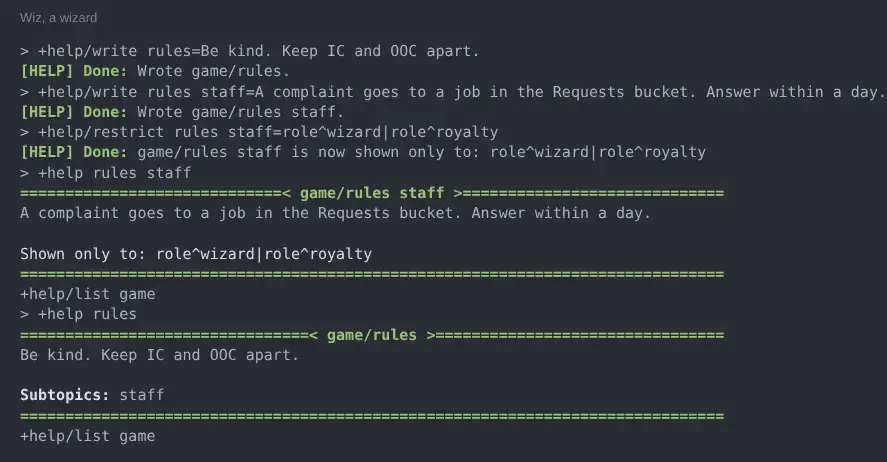
Section titled “Topics for staff only”Some topics are for staff alone, such as how the game’s settings are changed. A topic can carry a lock, and a reader who fails it never meets the topic: not on the front page, in a listing, in a search, under another topic’s subtopics or see-also line, nor by typing its name. A lock on a topic covers its subtopics too.
+help/restrict <topic>=<lock>shows one of the game’s topics only to those passing the lock.+help/unrestrict <topic>takes off that topic’s own lock. A lock on a topic above it, or on the whole source, still applies.
The lock is any key @lock takes, such as role^wizard|role^royalty or perm^config.admin. One
that cannot be read is refused. Someone who passes the lock sees it at the foot of the topic:
A player reading the same help finds rules with no subtopics, no rules staff, and no +config
help at all:
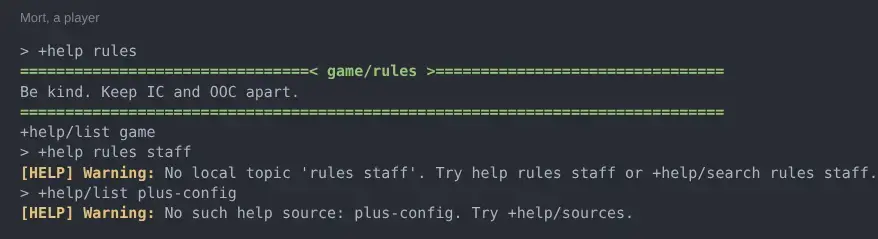
Packages lock their own staff topics. +config’s help is for those with config.admin, and
+health’s for those with players.view, because those are what the commands need. A package’s
topics about staff commands or settings are locked to the permission those commands check. Topics
about writing code against a package are for those with packages.admin, and the topics on writing
help itself for wizards and royalty.
The jobs package’s staff topics are for whoever works a bucket, whichever bucket that is. A player who files jobs sees only the topics about filing them:
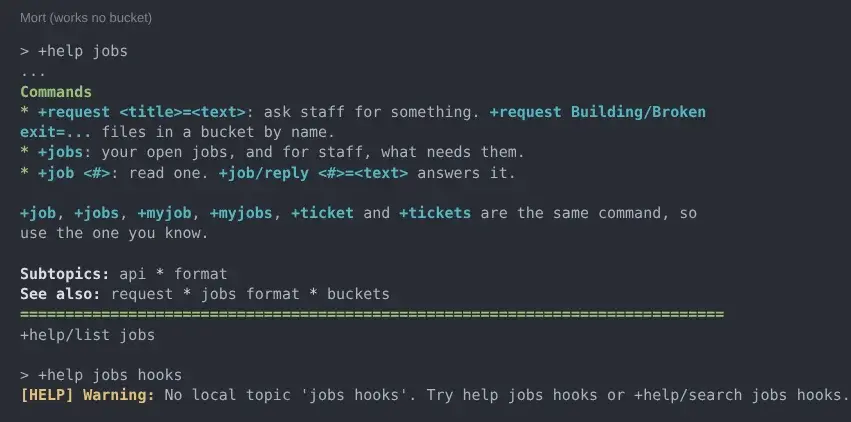
Someone who works the Requests bucket sees every subtopic, and Shown only to: Jobs staff at the
foot of each staff topic:

+help itself shows the topic index. Write your own with +help/write index=<text>; a topic
the game writes wins over a package’s of the same name. Upgrading a package never changes the
game’s topics.
Where topics come from
Section titled “Where topics come from”+help/sources lists each source, the object its topics are on, and how many it has. The game’s own
topics are the game source:
> +help/sources═══════════════════════════════╡ Help sources ╞═══════════════════════════════Source Object Name Topicsgame #12 Game Help 0plus-config #14 Config Help 3plus-help #11 Help Librarian's Help 5scene #16 Scene Help 10══════════════════════════════════════════════════════════════════════════════+help/source <name>=<object>For softcode that no package installed, staff can register its help object by hand:
+help/source <name>=<object> reads that object’s HELP tree as a source, and
+help/unsource <name> stops.
Help in a package
Section titled “Help in a package”A package carries its topics in a HELP attribute tree on an ordinary object, and registers that
object with the librarian in its package.yaml. The package manager writes the registration when
the package is installed and clears it when it is removed.
depends:  - package: plus-help    version: ">=1.0"
objects:  - ref: my_help    type: thing    name: My Help    attributes:      HELP: |-        One line describing what this package covers.      HELP`MYTHING: |-        What `+mything` does.      HELP`MYTHING`ADVANCED: |-        The topic "mything advanced", and a subtopic of "mything".      SEE`MYTHING: |-        scene|rules
- ref: my_help_registration target: "{{plus-help/librarian}}" attributes: SRC`MY-PACKAGE: |- {{my_help}}HELPis the line+helpshows for the source. It must be set, or the topics under it are not found.- Each
HELP`<TOPIC>is a topic, and the attribute tree makes the subtopics. SEE`<TOPIC>lists the topics it points to, split by|.LOCK`<TOPIC>is a lock key: only a reader who passes it sees that topic and its subtopics.LOCKon its own locks every topic on the object, which hides the whole source.
LOCK`MYTHING`ADVANCED: |- perm^softcode.mything.adminLock a topic to the permission its commands check, so the help and the command agree on who may use them.
The key is evaluated on its object before it is tested, so it can name one of the package’s own
objects by reference. When no single permission says who a topic is for, point an indirect lock at
a lock the package keeps on one of its objects. The jobs package locks its staff topics this way, to
a staff lock on its Jobs object that passes anyone who works a bucket:
LOCK`JOBS`HOOKS: |- @{{jobs}}/staffAn indirect lock shows at the foot of the topic as the object’s name and the lock’s name:
Shown only to: Jobs staff.
Keep the topics off an object that has to be WIZARD for its commands. The librarian is not
privileged, so it can list such an object’s topics but not show them. The scene package keeps
its commands on the Scene Logger and its help on a separate Scene Help thing.
A package written for other games keeps the registration out of the package itself, in a
<package>-help bridge package that depends on both. The package then
installs on a game without +help, and its topics appear where +help is. Every bundled package
does this: jobs-help holds the one SRC`JOBS leaf for jobs.
Package Format covers depends, objects and attach targets such as
{{plus-help/librarian}}.